Services
EPMware uses background services to handle various system operations including deployments, workflow processing, and ERP imports. These services must be started after initial configuration.
Starting Services
To start the required services:
- Navigate to Administration → Services
- Review the service status dashboard
- Start each required service
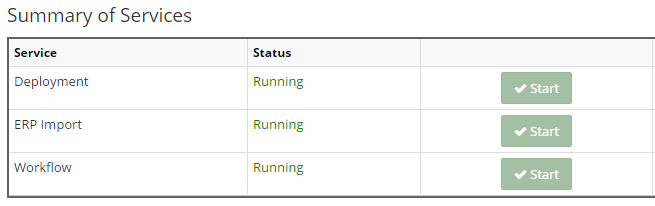
Services management interface
Required Services to Start
Click the Start button for each of these essential services:
- Deployment Service - Handles metadata deployment to target systems
- ERP Import Service - Manages data imports from ERP systems
- Workflow Service - Processes workflow approvals and routing
Service Start Order
Services should be started in the order listed above to ensure proper initialization.
Service Types
Deployment Service
The Deployment Service manages the promotion of metadata changes to target EPM applications.
Functions:
- Processes deployment requests
- Validates metadata before deployment
- Handles rollback operations
- Generates deployment logs
- Sends deployment notifications
ERP Import Service
The ERP Import Service handles integration with ERP systems for master data synchronization.
Functions:
- Scheduled data imports
- Data validation and transformation
- Error handling and reporting
- Import history tracking
- Notification of import status
Workflow Service
The Workflow Service processes approval workflows and manages request routing.
Functions:
- Routes requests through approval stages
- Sends approval notifications
- Tracks workflow history
Service Monitoring
Service Status Indicators
Services display status using color-coded indicators:
| Status | Color | Description |
|---|---|---|
| Running | Green | Service is active and processing |
| Stopped | Red | Service is not running |
Service Operations
Next Steps
After starting services:
- Create your first workflow
- Configure deployment settings
- Test end-to-end process flow
- Monitor service performance