Validations
EPMware provides comprehensive standard validations for supported applications, ensuring data integrity and compliance with target system requirements. These validations are automatically applied when applications are configured.
Overview
All standard validations for supported application types are configured as Logic Scripts in the Logic Builder module. These validations are automatically assigned when an application is registered in EPMware.
Key Features
- Automatic Assignment - Validations apply immediately upon application configuration
- Property-Based - Validations target specific member properties
- Application-Specific - Rules tailored to each target system's requirements
- Customizable - Clone and modify standard validations as needed
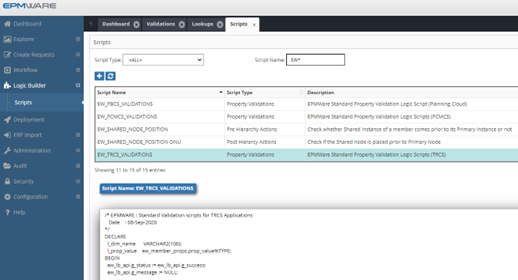
Logic Builder module showing standard validation scripts with EW prefix
Validation Architecture
How Validations Work
graph LR
    A[User Request] --> B[Property Validation]
    B --> C{Valid?}
    C -->|Yes| D[Process Request]
    C -->|No| E[Return Error]
    E --> F[Display Message]
    D --> G[Deploy to Target]
Validation Assignment
When an application is imported or created, EPMware automatically:
- Identifies the application type
- Assigns corresponding validation scripts
- Activates property-level checks
- Enables real-time validation
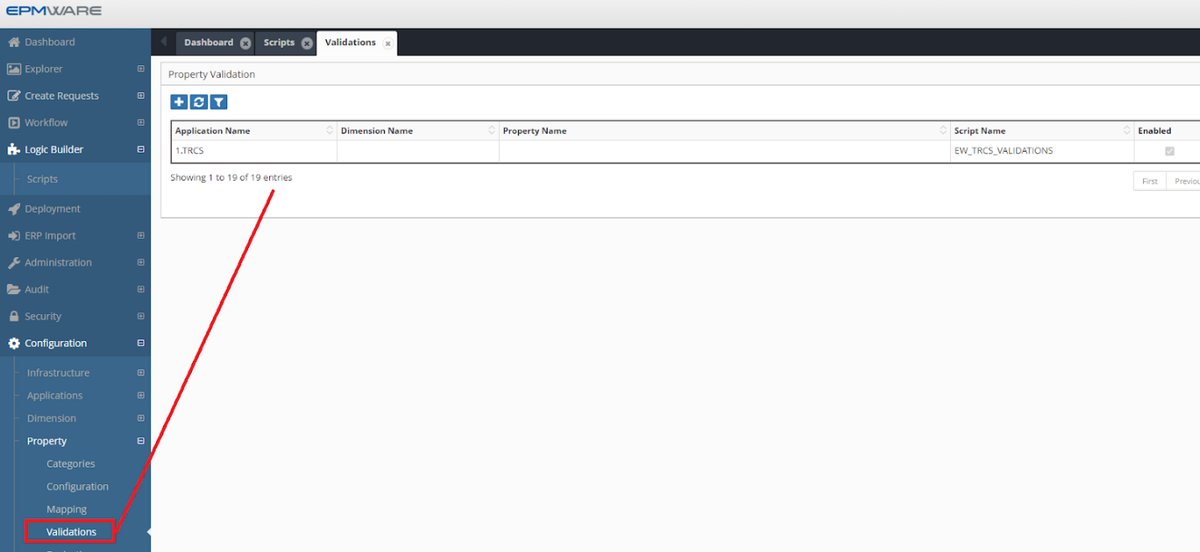
Association of standard validations to applications
Supported Applications
☁️ Oracle Cloud EPM
- PBCS - Planning & Budgeting
- FCCS - Financial Close
- TRCS - Tax Reporting
- ARCS - Account Reconciliation
- PCMCS - Profitability Management
☁️ OneStream
- Cloud
- On-Premise
🏢 Oracle On-Premise EPM
- HFM - Financial Management
- Essbase (ASO/BSO)
- Planning
- FDMEE - Data Management
🔄 ERP Systems
- Oracle Fusion Cloud
- Oracle EBS GL
- OneStream XF
Oracle EPM Cloud Validations
TRCS (Tax Reporting Cloud Service)
Validation Script: EW_TRCS_VALIDATIONS
Member Name & Alias Validations
| Validation | Rule | Max Length |
|---|---|---|
| Member Name | No trailing/leading spaces | 76 chars |
| Alias | Unique within alias table | 80 chars |
| Special Characters | Not allowed: " ] [ \t |
- |
| Reserved Prefixes | Cannot start with: OEP_, OFS_, OCX_ | - |
Prohibited Starting Characters
Reserved Words
The following words cannot be used as member names:
Click to expand full list of reserved words
- ALL, AND, ASSIGN, AVERAGE, CALC, CALCMBR - COPYFORWARD, CROSSDIM, CURMBRNAME - DIM, DIMNAME, DIV, DYNAMIC - EMPTYPARM, EQ, EQOP, EXCEPT, EXP - FLOAT, FUNCTION, GE, GEN, GROUP, GT - INTEGER, LE, LOCAL, LT - MBR, MBRNAME, MINUS, MISSING, MUL - NE, NON, NONINPUT, NOT, OR - PERCENT, PLUS, RELOP, SET - SKIPBOTH, SKIPMISSING, SKIPNONE, SKIPZERO - STATUS, TO, TOP, TYPE - UMINUS, UPPER, VARORXMBR - $$UNIVERSE$$, #MISSING, #MIPCMCS (Profitability & Cost Management)
Validation Script: EW_PCMCS_VALIDATIONS
Similar to TRCS with additional rules: - Member name max length: 80 characters - Supports POV-specific validations - Additional cost allocation constraints
PBCS/Planning
Validation Script: EW_HP_VALIDATIONS
Key Validations
- Data Storage Property
- Label Only members cannot be leaf members
-
Label Only members cannot have formulas
-
Account Type Property
-
If Account Type = Expense, Variance Reporting must be "Expense"
-
Variance Reporting Property
- Must align with Account Type settings
Essbase Validations
Validation Script: EW_ESSBASE_VALIDATIONS
ASO-Specific Rules
| Rule | Description | Applies To |
|---|---|---|
| Consolidation | Stored hierarchies require (+) aggregation | ASO only |
| Member Formula | Dynamic hierarchies only | ASO/BSO |
| Data Storage | Parent members use Dynamic Calc | BSO only |
Automation Options
Auto-Configure Data Storage (BSO)
Script: EW_EB_DATA_STORAGE_PROP
This optional script automatically: - Sets parent members to "Dynamic Calc" - Sets base members to "Store" - Triggers on hierarchy changes
Configuration Steps: 1. Navigate to Configuration → Dimensions → Hierarchy Actions 2. Assign script as Post Hierarchy Action 3. Select "Create Member" action 4. Apply to dimension
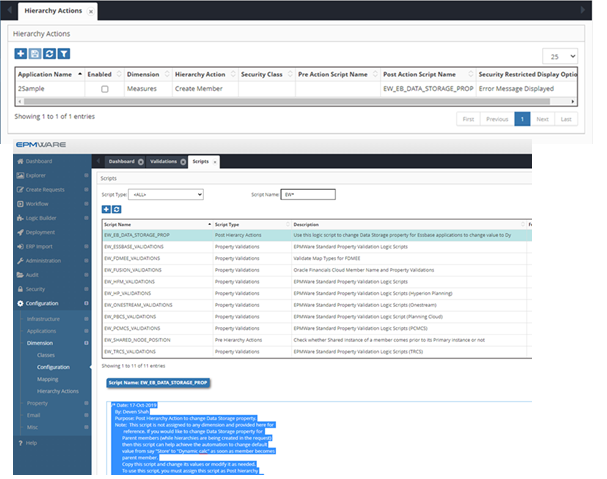
Assigning post-hierarchy action script to dimension
HFM Validations
Validation Script: EW_HFM_VALIDATIONS
Character Restrictions
| Character Type | Prohibited | Notes |
|---|---|---|
| Special Chars | " # * + , - . / ; @ { } |
In member names |
| Ampersand | & | In aliases only |
| ICP Rules | - | Special validation logic |
ICP Validation Rules
If "Is ICP" = Y or R, then "ICP Top Member" must be assigned (cannot be "ICP None")
ERP System Validations
Oracle Fusion Cloud
Validation Script: EW_FUSION_VALIDATIONS
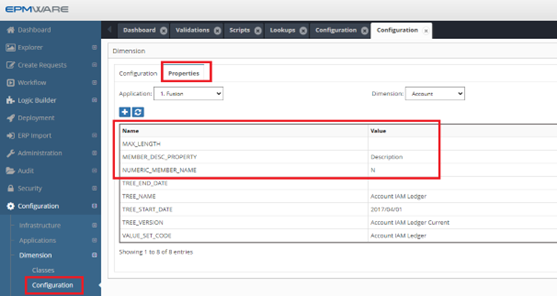
Oracle Fusion GL validation configuration
Dimension-Specific Rules
| Property | Validation | Configuration |
|---|---|---|
| Member Length | Max defined by segment | Set in dimension properties |
| Numeric Members | Account dimension only | NUMERIC_MEMBER_NAME = Y |
| Summary Flag | Required for parents | Auto-set to Y |
| Allow Posting | Disabled for parents | Auto-set to N |
OneStream
Validation Script: EW_ONESTREAM_VALIDATIONS
Reserved Words
- Account, All, Cons, Consolidation
- Default, DimType, Entity
- Flow, Origin, IC, None, POV, Parent, Root
- All Root*Dim variations
Special Character Restrictions
FDMEE Validations
Validation Script: EW_FDMEE_VALIDATIONS
Mapping Type Rules
| Mapping Type | Validation Rule |
|---|---|
| EXPLICIT | Source and Target required |
| BETWEEN | One comma required in Source |
| IN | No commas allowed in Source |
| LIKE | Must contain * or ? wildcard |
Custom Validations
Creating Custom Validations
- Create New Validation
- Logic Builder → Create Script
- Type: Property Validation
-
Write custom logic
-
Assign to Applicat2on
- Configuration → Property → Validations
- Add validation rule
- Select target properties
Validation Script Structure
// Example validation script structure
function validateProperty(context) {
    var memberName = context.getMemberName();
    var propValue = context.getPropertyValue();

    // Validation logic
    if (propValue.length > 80) {
        return {
            valid: false,
            message: "Property exceeds maximum length of 80 characters"
        };
    }

    return { valid: true };
}
Validation Management
Enabling/Disabling Validations
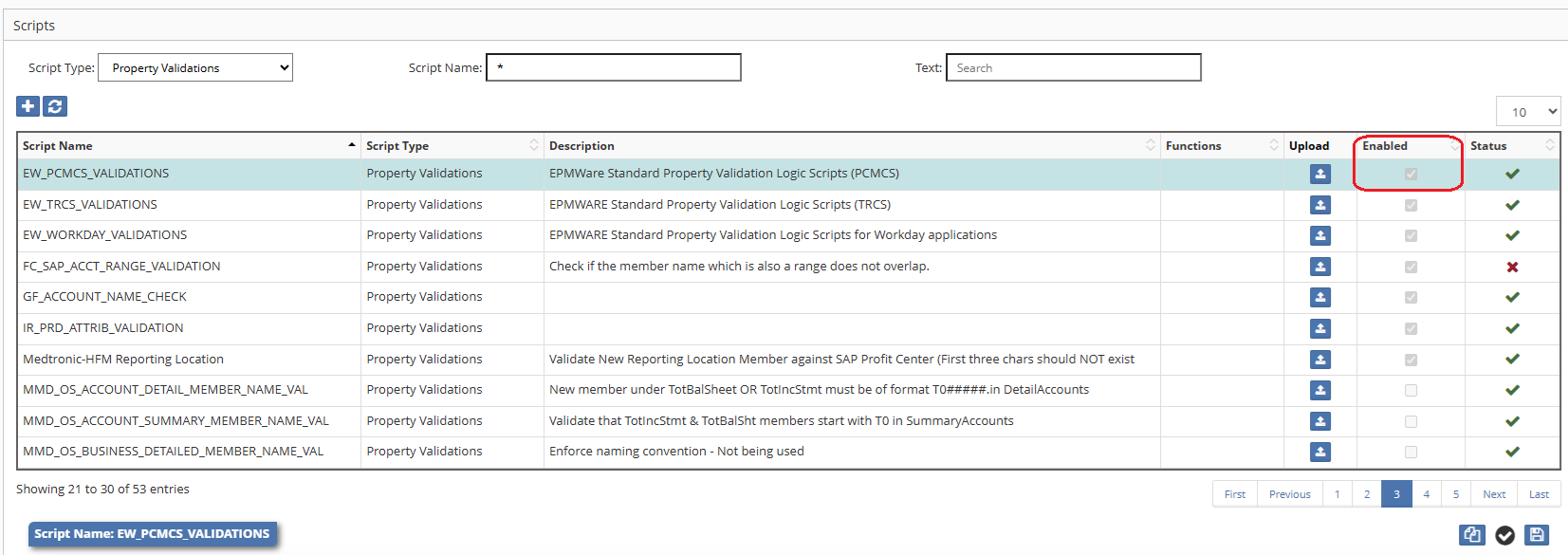
Managing validation status in Property Validations screen
| Action | Steps | Impact |
|---|---|---|
| Disable | Uncheck "Enabled" box | Validation skipped |
| Enable | Check "Enabled" box | Validation active |
| Delete | Right-click → Delete | Permanent removal |
Validation Priority
When multiple validations apply:
- Member-level validations execute first
- Property-specific validations next
- Dimension-level validations
- Application-level validations last
Best Practices
DO's ✅
- Test custom validations thoroughly
- Document validation rules
- Use descriptive error messages
- Keep validation logic simple
- Monitor validation performance
DON'Ts ❌
- Don't modify standard validations directly
- Don't disable critical validations
- Don't create overlapping rules
- Don't use complex SQL in validations
- Don't ignore validation errors
Troubleshooting
Common Validation Issues
| Issue | Cause | Solution |
|---|---|---|
| Validation not firing | Script disabled | Enable in configuration |
| False positives | Logic error | Review script logic |
| Performance impact | Complex SQL | Optimize queries |
| Missing validations | Not assigned | Check property assignments |
Debug Steps
- Check Script Status
- Logic Builder → View script
-
Verify "Enabled" status
-
Review Assignment
- Configuration → Property → Validations
-
Confirm application mapping
-
Test Manually
- Create test request
- Trigger specific validation
- Review error messages
Quick Reference
Validation Scripts by Application
| Application Type | Script Name | Auto-Applied |
|---|---|---|
| TRCS | EW_TRCS_VALIDATIONS | ✅ |
| PCMCS | EW_PCMCS_VALIDATIONS | ✅ |
| PBCS/Planning | EW_HP_VALIDATIONS | ✅ |
| Essbase | EW_ESSBASE_VALIDATIONS | ✅ |
| HFM | EW_HFM_VALIDATIONS | ✅ |
| FDMEE | EW_FDMEE_VALIDATIONS | ✅ |
| Fusion GL | EW_FUSION_VALIDATIONS | ✅ |
| OneStream | EW_ONESTREAM_VALIDATIONS | ✅ |
Optional Enhancement Scripts
| Script | Purpose | Application |
|---|---|---|
| EW_EB_DATA_STORAGE_PROP | Auto-set data storage | Essbase BSO |
| EW_DERIVE_CONSOLIDATION | Calculate consolidation | All |
| EW_SMART_LIST_VALIDATION | Validate smart lists | Planning |
Support
For validation assistance:
📧 Email: support@epmware.com
📞 Phone: 408-320-7171
Related Documentation
Validation Tip
Always test validation changes in a non-production environment first. Use the Logic Builder's validate function to check syntax before saving.